
computer—then beware—any website you’re visiting in your web
browser can turn on your device camera without your permission.
Ironically, even if you had ever installed the Zoom client on
your device and simply uninstalled it, a remote attacker can still
activate your webcam.
Zoom is one of the most popular cloud-based meeting platforms
that provide video, audio, and screen sharing options to users,
allowing them to host webinars, teach online courses, conduct
online training, or join virtual meetings online.
In a Medium post
published today, cybersecurity researcher Jonathan Leitschuh
disclosed details of an unpatched critical security vulnerability
in the Zoom client app for Apple Mac computers, which if combined
with a separate flaw, could allow attackers to execute arbitrary
code on the targeted systems remotely.
Jonathan responsibly reported the security vulnerability to the
affected company over 90 days ago, but the Zoom team failed to
offer a proper security patch, putting privacy and security of its
over 4 million users at risk.
The vulnerability leverages the click-to-join feature of the
popular conferencing software that has been designed to
automatically activate Zoom app installed on the system, allowing
participants to quickly join a video-meeting through their web
browser as soon as they click on an invite link, for example,
https://zoom.us/j/492468757.
Jonathan found that to offer this feature the Zoom software runs
a local web server on the system—on port 19421—that “insecurely”
receives commands through the HTTPS GET paraments and any website
in your opened web browser can interact with it.
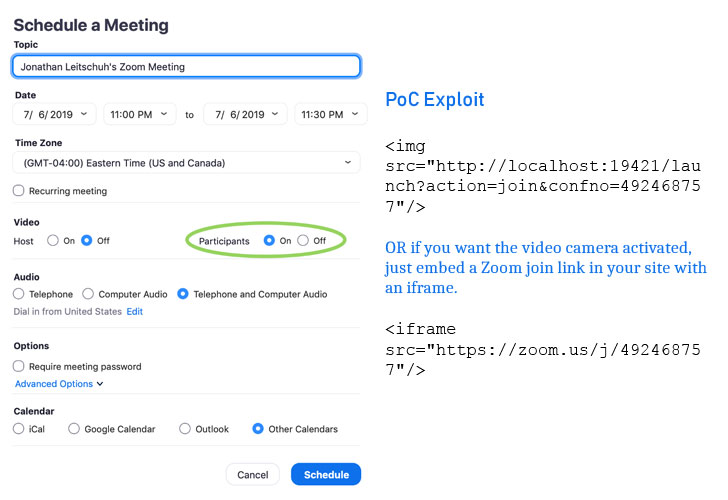
create an invite link through his account on the Zoom website and
embed it on a third-party website as an image tag or using an
iFrame and just convenience the targets into visiting that website.
“Enabling ‘Participants: On’ when setting up a meeting, I
discovered that anyone joining my meeting automatically had their
video connected,” Jonathan said.
As soon as Mac users with Zoom client installed on their system
visits the malicious website, it will forcefully launch the Zoom
app and turn on their webcam, exposing them to attackers.
“This could be embedded in malicious ads, or it could be used as a
part of a phishing campaign. If I were actually an attacker, I’d
probably invest some time to also include the incrementing port
logic that the code in the Javascript running on Zoom’s site,”
Jonathan said.
problem as Jonathan explained the click-to-join feature also
accepts a command that automatically reinstalls Zoom without users’
intervention or permission.
Besides turning on the webcam, the vulnerability can also be abused
to DoS attack the targeted Mac computer by simply sending a large
number of repeated GET requests to the local server.
“Zoom did end up patching this vulnerability, but all they did was
prevent the attacker from turning on the user’s video camera,”
Jonathan said. “They did not disable the ability for an attacker to
forcibly join a call anyone visiting a malicious site.”
Mac.

to both the Chromium and Mozilla teams, but since the issue does
not actually reside in their web browsers, there’s not much these
companies can do.
However, the good news is that users can still fix this issue at
their ends. All you need to do is manually disable the setting that
allows Zoom to automatically turn your webcam on when joining a
meeting.
For this, just go into the Zoom settings window and enable the
“Turn off my video when joining a meeting” setting.
You can also run a series of Terminal commands, which you can
find at the bottom of Jonathan’s post, to uninstall the web server
completely.
References
- ^
Medium post
(medium.com)
Read more http://feedproxy.google.com/~r/TheHackersNews/~3/yzqo-B9BucM/webcam-hacking-video-conferencing.html