
of security.” That was 19 years ago (!) and since then, cyber
security has only become more complex.
Today, controls dramatically outnumber staff available to
support them. The Bank of America has a $400-million cyber budget
to hire security staff and implement a broad array of products.
But what if your budget and sophistication is just a tiny
fraction of the Bank of America’s?
The remaining 99% of organizations understand that they don’t
have sufficient protection for their internal network, but they
also realize that to be sufficiently secured they need to buy
multiple solutions and hire a large team to maintain it – which
isn’t an option.
So they either stay with just an AV or buy a point solution to
defend a specific part of their internal environment from
particular types of attacks – only to later find out it doesn’t
meet what they really need.
Cynet wants to change all that.
Cynet[1] is trying to change the
face of the industry with a consolidated platform that brings
together multiple security capabilities—network and endpoint—while
automating and simplifying the job of the defender.
That’s why they built a threat-agnostic platform from the ground
up, converging all the technologies and capabilities to answer the
visibility, prevention, detection and response needs of the
resource-constrained organization. This means these organizations
can defend their internal network, and Cynet has made it simple and
intuitive, so high expertise is no longer required.
If you don’t have the resources of a fortune 500 company with a
large security team and stack of security solutions already in
place—Cynet is something to look into.
Cynet built the platform to be simple and easy to deploy and
use; provide broad visibility across the network, endpoints, files
and users; protect against a very wide range of attacks including
common attacks as well as complex multi-layered attacks; and
provide a team of security experts available 24/7 that complements
whatever expertise you have in place.
Getting Started: Deployment and Visibility
Cynet includes very flexible deployment methods: On-premise, IAAS,
SAAS, and hybrid mode.
We evaluated Cynet using their SaaS version with a free trial[2] across a broad spectrum
of capabilities—deployment, visibility, prevention, detection, and
response.
Cynet installed quickly—in just a few minutes. We tried it on a
few hundred endpoints. The speed and ease of the installation were
remarkable.
In environments with many agents already deployed, additional
agents are often resource hogs, slowing down system performance and
giving false positives, creating blue screens, and blocking access
to things that people legitimately need for business purposes.
For some, agents require a degree of QA to ensure nothing gets
broken. For less complicated environments, agents are just fine.
How do you deal with the spectrum?
Cynet has developed a unique “dissolvable exe” approach to work
with organizations along the spectrum of no agents, for those who
have way too many.
It gives customers a choice based on what’s right for their
infrastructure which – in all cases – is fast, easy to deploy and
incurs no performance issues.
Once installed, Cynet starts by mapping the entire IT DNA
architecture. Cynet scans corporate assets including endpoints,
users, files and network traffic. Cynet takes its broad view to
correlate and connect behaviors, evidence, indicators, and
anomalies to detect attacks. Very quickly, you get a dashboard of
everything Cynet has uncovered:
 |
| Figure 1: Cynet dashboard |
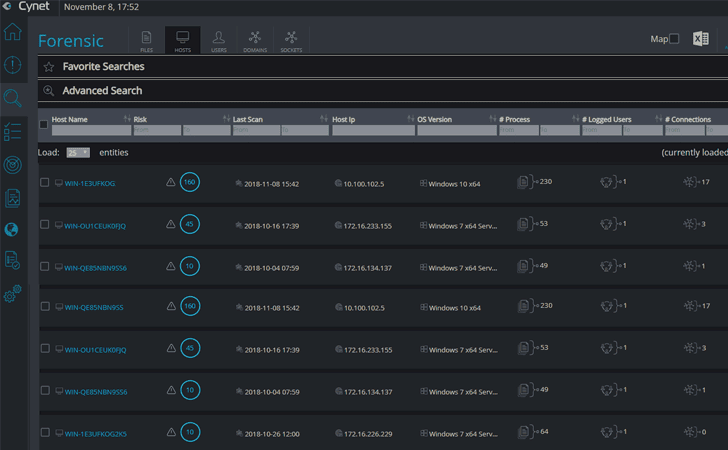
Within minutes, we could already see all live hosts:
 |
| Figure 2: Asset list |
The immediate value Cynet provides is comprehensive visibility into
the organization, including networks, applications, inventory,
asset management and vulnerability.
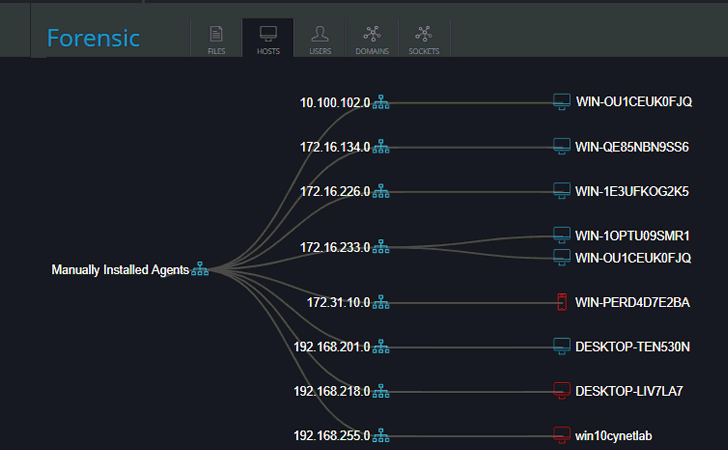
Cynet creates a mapping of your organization’s network, by
connecting endpoint with networks. Any risky endpoints are marked
in red and clickable for a deeper look:
 |
| Figure 3: Network map |
The other insights provided upon installation are centered around
vulnerability management and compliance, in 4 main areas:
1. OS Updates: Cynet checks the installed Windows patch and
raises an indication if the patches are missing. In addition, Cynet
creates an inventory of installed patches.
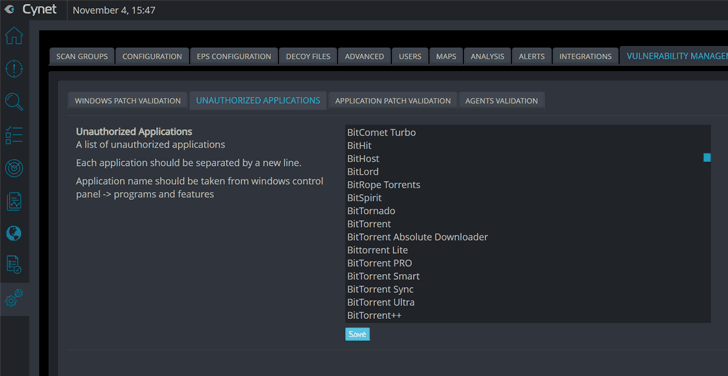
2. Unauthorized applications: Cynet provides a list of
blacklisted applications that can be customized. Cynet will alert
if any unauthorized applications are found.
 |
| Figure 4: Vulnerability Management: Unauthorized applications |
3. Outdated applications: Cynet checks if a list of outdated
application versions is installed, and if so – alerts if anything
is found.
4. Security policy validation: Cynet checks if a list of
installed agents exists on the endpoints and are currently running
– alerting if anything is missing.
In addition, for correlation capabilities, the vulnerability
management data is available via the “Forensic” screen for creating
any type of report, query, etc.
Using the data gathered, Cynet’s Forensics screen immediately
allows users to search across files, hosts, users, and sockets.
Every object is clickable to easily understand its history.
For example, you can search for common security issues such as
users that have not replaced a password, what files are called upon
startup, what applications are running on your endpoints and look
for unauthorized access to applications using network
visibility.
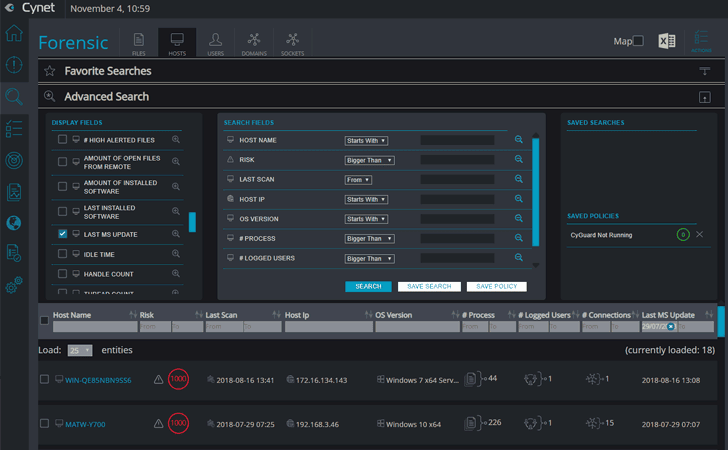 |
| Figure 5: A list of hosts that were not updated over a specific period of time. |
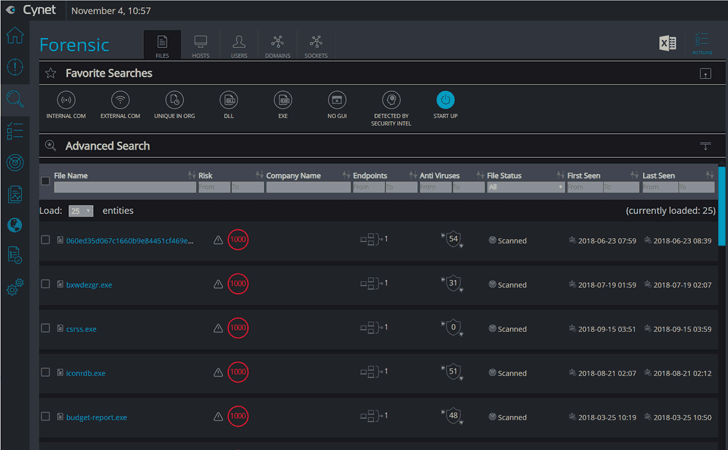 |
| Figure 6: All files running on system start-up |
 |
| Figure 7: All users that haven’t changed their password during a specific period and logged in over the last week |
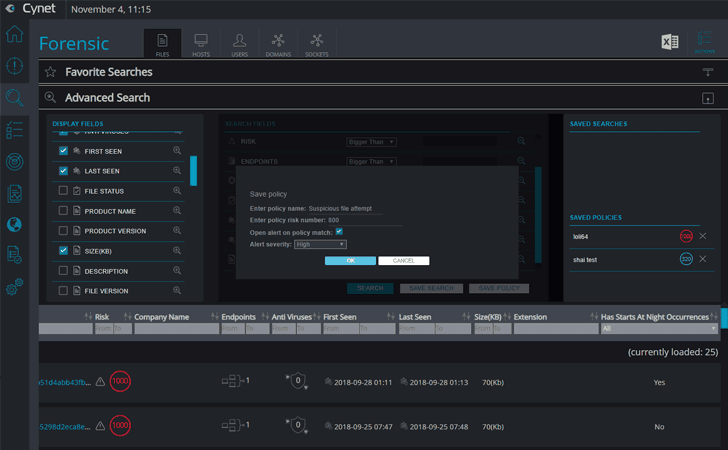 |
| Figure 8: Save a search as a policy to trigger an alert or for future use |
As part of the simplicity of the platform, every object is
clickable and once clicked, all data is presented in a simple way
on a single timeline, with all the associated history and
objects:
 |
| Figure 9: Host object – including risk score, associated alerts, and all relevant data |
Mature security teams can also leverage all data being collected by
Cynet through a full-documented rest API.
Prevention
Cynet’s approach to prevention starts with checkbox configuration
for the types of threats you wish to prevent automatically:
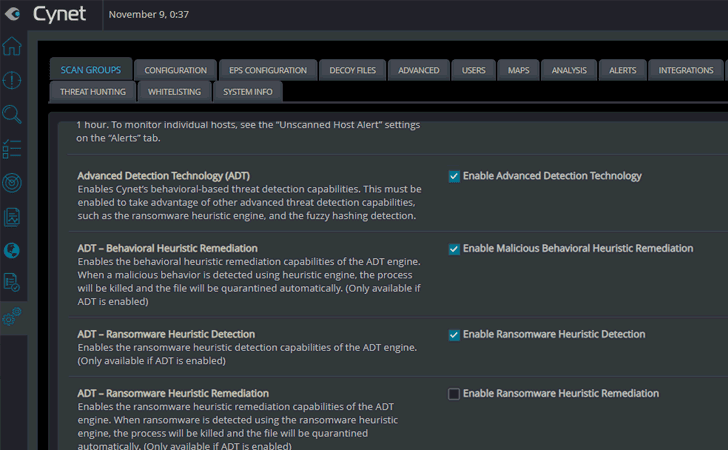 |
| Figure 10: Configure prevention |
For resource-strapped organizations, this means you automate as
much—or a little—as you want. In addition, the capability allows
you to simplify grunt work, but focus on the more strategic threats
you face uniquely. This means you can choose and create your own
auto remediation rules.
Even though the process is automated, Cynet gives you the option
to show you what has been auto-remediated:
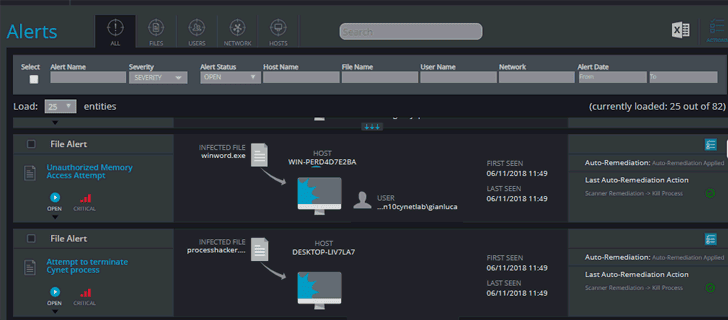 |
| Figure 11: Auto-remediated threat alerts |
Another key preventative capability in Cynet is critical component
whitelisting. Cynet enhances endpoint protection with critical
component whitelisting. Cynet protects vital components of the
operating system by allowing access only to approved files,
processes and communications. It does this by creating a list of
whitelisted items, so the system knows what to let in, and what to
deny entry.
Detection
Cynet’s approach to security is about convergence. Namely, Cynet
not only brings together detection, correlation and automation—but
unlike point solutions—Cynet also converges its analysis across
endpoints, for users, files and networks.
In addition to traditional endpoint security, Cynet’s detection
capabilities also include EDR, UBA, deception and network
analytics.
When seeing a live demo of the capabilities for the first time,
it’s impressive to see the variety of types of alerts that can be
generated – such as malicious behavior, exploitation, ransomware,
lateral movement, brute force, user login anomalies, DNS Tunneling,
privilege escalation, credential theft and more, which are the
result of the multiple detection layers that Cynet includes.
Cynet prioritizes the alerts and makes them easy to understand
and act upon—by pre-correlating all related objects into one single
view of the alert, highlighting actionable information, and
presenting additional information and recommendations with a click
of a button. Everything is wrapped in a simple, self-explanatory
interface that can be used by anyone with a minimal level of
expertise:
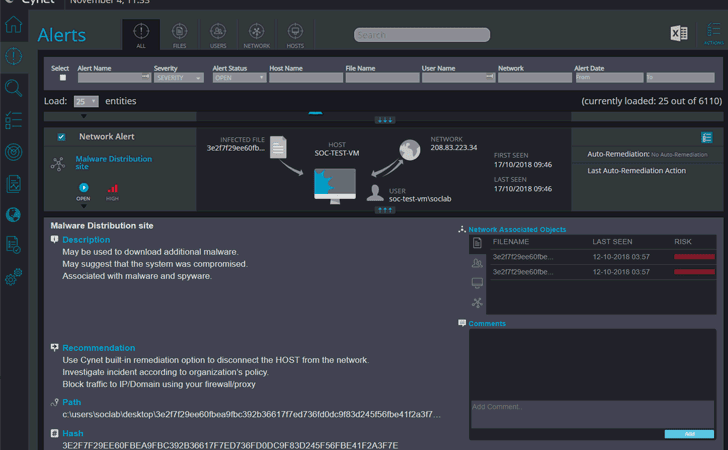 |
| Figure 12: Alert |
In addition to the comprehensive detection, Cynet claims to have a
very low false-positive ratio, as a result of the multi layered
approach.
Cynet Response
Cynet provides an impressive range of response and remediation
capabilities.
Analysis capabilities:
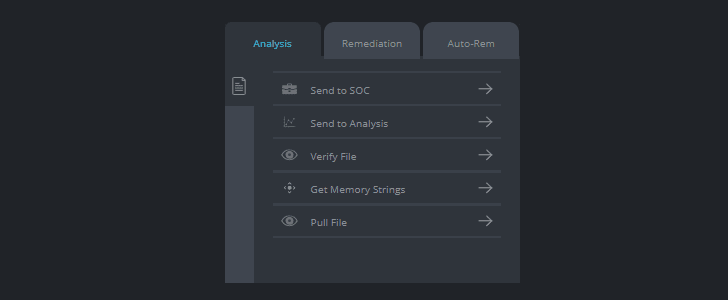 |
| Figure 13: Analysis capabilities |
In cases of attacks which are not prevented or require further
analysis, Cynet has various analysis remediation actions available
in order to provide the end-user with further details:
- Send to SOC – send the suspicious file to Cynet’s operations
team, and they will classify the file for the end-user. - Send to Analysis – send the file to a sandbox which is part of
the Cynet platform, there it will run dynamically in an isolated
environment, and a report will be generated. - Verify File – this is to verify if the file still exists on the
endpoint or was deleted. - Get memory strings/memory dump–collect the memory strings of a
file, which ran as a process, for an analyst to identify malicious
actions which were performed in the endpoint’s memory. - Pull File –pull any file which was scanned by Cynet from the
endpoint to the Cynet server. This is in cases where the end user
would like to analyze the file using other security products, or in
cases where he would like to send the file to a specialist (for
example).
Response capabilities:
 |
| Figure 14: Response capabilities |
Cynet provides advanced and comprehensive response capabilities for
the hosts, users, files or networks. For example:
- Kill, delete or quarantine malicious files.
- Disable users and run commands.
- Shut down the process or restart hosts.
- Isolate or block traffic.
Automated Response:
For each alert Cynet creates, the user can create and customize his
own automatic remediation rule, to improve the incident response
process and the prevention of a real-time threat.
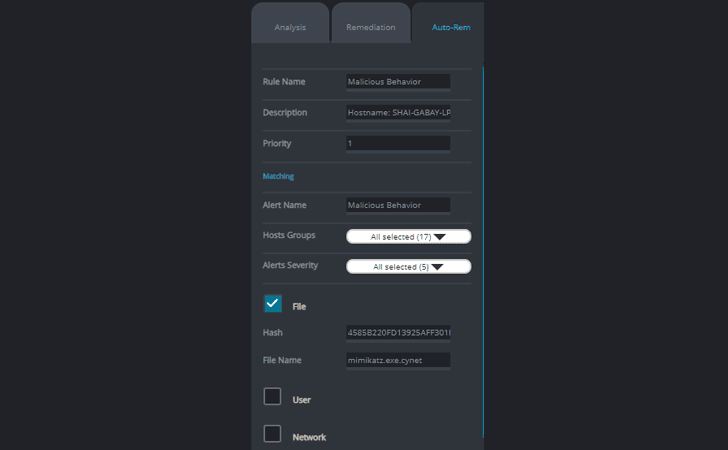 |
| Figure 15: Automated response |
As part of this, Cynet provides a comprehensive rule creation
mechanism that allows the user to customize the action according to
the organization’s needs, such as:
Which group to apply the rule to, whom to exclude, etc.
24/7 Cyber SWAT Team
Cynet includes CyOps – a 24/7 operations team – at no additional
cost, to completement the expertise that their customer lack. What
do you get? It’s not a watered-down service that incurs hidden
costs if you go above a certain threshold.
It’s a proactive service – if there something you should care
about, a threat you missed, or if you need to perform forensics or
hunt for threats—someone contacts you. Their service
includes:
- Forensics: In the event of an incident, Cynet experts perform
breach post mortems. - Malware analysis: Cynet malware reverse engineers analyze
malware samples to get full attack life-cycle, origin and potential
impact of malware, quickly identifying threat actors, motivations
and likely targets. - Threat hunting: Cynet’s crowd-sourced intelligence from the
customer ecosystem provides the unparalleled ability to uncover
advanced threats across users, endpoints, files, and networks.
Conclusion
Cynet is banking on an industry moving from fragmentation to
consolidation. From the looks of what they’ve assembled, they may
be onto something big.
For organizations that do not have the resources and security
expertise of a Fortune 500 company, we see Cynet as the ideal
solution – its rapid deployment, single-pane-of-glass approach, and
multiple technology capabilities is a real game changer.
If your organization is 500 endpoints or less, we recommend
signing up for Cynet’s SaaS free trial: https://saas.cynet.com/signup[3]
If your organization is larger, we suggest requesting a demo to
get a personal walkthrough of the platform: https://www.cynet.com/request-a-demo/[4]
References
- ^
Cynet
(www.cynet.com) - ^
SaaS version with a free trial
(saas.cynet.com) - ^
https://saas.cynet.com/signup
(saas.cynet.com) - ^
https://www.cynet.com/request-a-demo/
(www.cynet.com)
Read more http://feedproxy.google.com/~r/TheHackersNews/~3/trduj4LPg88/cynet-cyber-security-solution.html