
unpatchable hardware vulnerabilities that affect all desktops and
laptops sold in the past 9 years with Thunderbolt, or
Thunderbolt-compatible USB-C ports.
Collectively dubbed ‘ThunderSpy,’ the vulnerabilities can be
exploited in 9 realistic evil-maid attack scenarios, primarily to
steal data or read/write all of the system memory of a locked or
sleeping computer—even when drives are protected with full disk
encryption.
In a nutshell, if you think someone with a few minutes of
physical access to your computer—regardless of the location—can
cause any form of significant harm to you, you’re at risk for an
evil maid attack.
According to Björn Ruytenberg of the Eindhoven University of
Technology, the ThunderSpy
attack[1] “may require opening a
target laptop’s case with a screwdriver, [but] it leaves no trace
of intrusion and can be pulled off in just a few minutes.”
In other words, the flaw is not linked to the network activity
or any related component, and thus can’t be exploited
remotely.
“Thunderspy works even if you follow best security practices by
locking or suspending your computer when leaving briefly, and if
your system administrator has set up the device with Secure Boot,
strong BIOS and operating system account passwords, and enabled
full disk encryption,” the researcher said.
Besides any computer running Windows or Linux operating systems,
Thunderbolt-powered Apple MacBooks, except retina versions, sold
since 2011 are also vulnerable to Thunderspy attack, but
partially.
ThunderSpy Vulnerabilities
The following list of seven Thunderspy vulnerabilities affects
Thunderbolt versions 1, 2 and 3, and can be exploited to create
arbitrary Thunderbolt device identities, clone user-authorized
Thunderbolt devices, and finally, obtain PCIe connectivity to
perform DMA attacks.
- Inadequate firmware verification schemes
- Weak device authentication scheme
- Use of unauthenticated device metadata
- Downgrade attack using backward compatibility
- Use of unauthenticated controller configurations
- SPI flash interface deficiencies
- No Thunderbolt security on Boot Camp
For those unaware, Direct memory access (DMA) attacks against
the Thunderbolt port is not new and has previously been
demonstrated with ThunderClap
attacks[2].
DMA-based attacks let attackers compromise targeted computers in
a matter of seconds just by plugging a malicious hot-plug
devices—such as an external network card, mouse, keyboard, printer,
or storage—into Thunderbolt port or the latest USB-C port.
In brief, DMA attacks are possible because Thunderbolt port
works at a very low-level and with high privileged access to the
computer, allowing connected peripherals to bypass operating system
security policies and directly read/write system memory, which may
contain sensitive information including your passwords, banking
logins, private files, and browser activity.
one of them was ‘security levels’ that prevents unauthorized
Thunderbolt PCIe-based devices from connecting without user
authorization.
“To further strengthen device authentication, the system is said
to provide ‘cryptographic authentication of connections’ to prevent
devices from spoofing user-authorized devices,” the researcher
said.
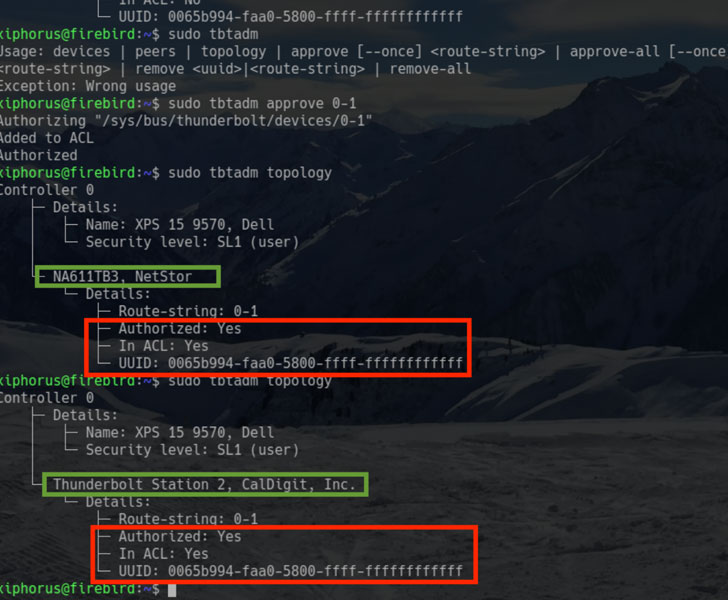
However, by combining the first three Thunderspy flaws, an
attacker can break the ‘security levels’ feature, and load an
unauthorized malicious Thunderbolt device by forging Thunderbolt
device identities, as shown in a video demonstration shared by
Ruytenberg.
“Thunderbolt controllers store device metadata in a firmware
section referred to as Device ROM (DROM). We have found that the
DROM is not cryptographically verified. Following from the first
issue, this vulnerability enables constructing forged Thunderbolt
device identities,” he added.
“In addition, when combined with the second issue, forged
identities may partially or fully comprise arbitrary data.”
“In addition, we show unauthenticated overriding of Security
Level configurations, including the ability to disable Thunderbolt
security entirely, and restoring Thunderbolt connectivity if the
system is restricted to exclusively passing through USB and/or
DisplayPort,” he added.
“We conclude this report by demonstrating the ability to
permanently disable Thunderbolt security and block all future
firmware updates.”
According to Ruytenberg, some latest systems available in market
since 2019 include Kernel DMA protection that partially mitigates
Thunderspy vulnerabilities.
To know if your system is
affected[3] by Thunderspy
vulnerabilities, Ruytenberg has also released a free and
open-source tool, called Spycheck.
Interestingly, when the researcher reported Thunderspy
vulnerabilities to Intel, the chip company revealed it had already
been aware of some of them—with no plans to patch or disclose it to
the public.
Ruytenberg claims to have found more potential vulnerabilities
in Thunderbolt protocol, which is currently are part of an ongoing
researcher and expected to be revealed soon as ‘Thunderspy 2.’
In conclusion, if you consider yourself a potential target to
evil-maid attacks and carrying a Thunderbolt system with you,
always avoid leaving your devices unattended or power off the
system completely, or at least consider using hibernation instead
of sleep mode.
Besides this, if you want to be more paranoid, avoid leaving
your Thunderbolt peripherals unattended or lending them to
anybody.
References
- ^
ThunderSpy attack
(thunderspy.io) - ^
ThunderClap attacks
(thehackernews.com) - ^
know if your system is affected
(github.com)
Read more http://feedproxy.google.com/~r/TheHackersNews/~3/-c-zVB8x_pY/thunderbolt-vulnerabilities.html