
When the headlines focus on breaches of large enterprises like
the Optus breach, it’s easy for smaller businesses to think they’re
not a target for hackers. Surely, they’re not worth the time or
effort?
Unfortunately, when it comes to cyber security, size doesn’t
matter.
Assuming you’re not a target leads to lax security practices in
many SMBs who lack the knowledge or expertise to put simple
security steps in place. Few small businesses prioritise
cybersecurity, and hackers know it. According to Verizon, the
number of smaller businesses being hit has climbed steadily in the
last few years – 46% of cyber breaches in 2021 impacted businesses
with fewer than 1,000 employees.
Cyber security doesn’t need to be difficult
Securing any business doesn’t need to be complex or come with a
hefty price tag. Here are seven simple tips to help the smaller
business secure their systems, people and data.
1 — Install anti-virus software everywhere
Every organisation has anti-virus on their systems and devices,
right? Unfortunately, business systems such as web servers get
overlooked all too often. It’s important for SMBs to consider all
entry points into their network and have anti-virus deployed on
every server, as well as on employees’ personal devices.
Hackers will find weak entry points to install malware, and
anti-virus software can serve as a good last-resort backstop, but
it’s not a silver bullet. Through continuous monitoring[1]
and penetration testing you can identify weaknesses and
vulnerabilities before hackers do, because it’s easier to stop a
burglar at the front door than once they’re in your home.
2 — Continuously monitor your perimeter
Your perimeter is exposed to remote attacks because it’s
available 24/7. Hackers constantly scan the internet looking for
weaknesses, so you should scan your own perimeter too. The longer a
vulnerability goes unfixed, the more likely an attack is to occur.
With tools like Autosploit[2]
and Shodan[3]
readily available, it’s easier than ever for attackers to discover
internet facing weaknesses and exploit them.
Even organisations that cannot afford a full-time, in-house
security specialist can use online services like Intruder to run
vulnerability scans[4]
to uncover weaknesses.
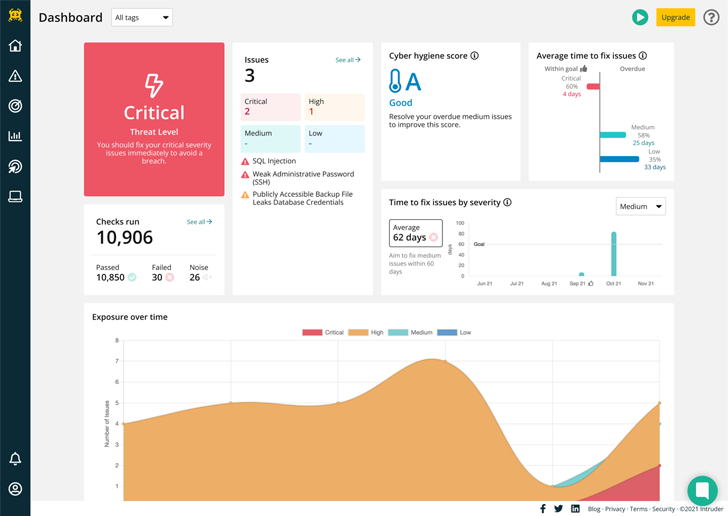
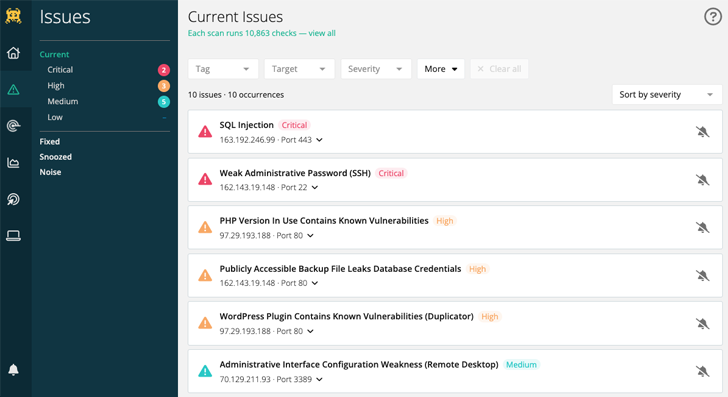
Intruder is a powerful vulnerability scanner that provides a
continuous security review of your systems. With over 11,000
security checks, Intruder makes enterprise-grade scanning easy and
accessible to SMBs.
Intruder will promptly identify high-impact flaws, changes in
the attack surface, and rapidly scan your infrastructure for
emerging threats.
3 — Minimise your attack surface
Your attack surface is made up of all the systems and services
exposed to the internet. The larger the attack surface, the bigger
the risk. This means exposed services like Microsoft Exchange for
email, or content management systems like WordPress can be
vulnerable to brute-forcing or credential-stuffing, and new
vulnerabilities are discovered almost daily in such software
systems. By removing public access to sensitive systems and
interfaces which don’t need to be accessible to the public, and
ensuring 2FA is enabled where they do, you can limit your exposure
and greatly reduce risk.
A simple first step in reducing your attack surface is by using
a secure virtual private network (VPN). By using a VPN, you can
avoid exposing sensitive systems directly to the internet whilst
maintaining their availability to employees working remotely. When
it comes to risk, prevention is better than cure – don’t expose
anything to the internet unless it’s absolutely necessary!
4 — Keep software up to date
New vulnerabilities are discovered daily in all kinds of
software, from web browsers to business applications. Just one
unpatched weakness could lead to full compromise of a system and a
breach of customer data; as TalkTalk discovered[5]
when 150,000 of its private data records were stolen.
According to a Cyber Security Breaches Survey, businesses that
hold electronic personal data of their customers are more likely
than average to have had breaches. Patch management is an essential
component of good cyber hygiene, and there are tools and services
to help you check your software for any missing security
patches.
5 — Back up your data
Ransomware is on the increase. In 2021, 37% of businesses and
organisations were hit by ransomware according to research by Sophos[6]. Ransomware encrypts any
data it can access, rendering it unusable, and can’t be reversed
without a key to decrypt the data.
Data loss is a key risk to any business either through malicious
intent or a technical mishap such as hard disk failure, so backing
up data is always recommended. If you back up your data, you can
counter attackers by recovering your data without needing to pay
the ransom, as systems affected by ransomware can be wiped and
restored from an unaffected backup without the attacker’s key.
6 — Keep your staff security aware
Cyber attackers often rely on human error, so it’s vital that
staff are trained in cyber hygiene so they recognise risks and
respond appropriately. The Cyber Security Breaches Survey 2022
revealed that the most common types of breaches were staff
receiving fraudulent emails or phishing attacks (73%), followed by
people impersonating the organisation in emails or online (27%),
viruses, spyware and malware (12%), and ransomware (4%).
Increasing awareness of the benefits of using complex passwords
and training staff to spot common attacks such as phishing emails
and malicious links, will ensure your people are a strength rather
than a vulnerability.
7 — Protect yourself relative to your
risk
Cyber security measures should always be appropriate to the
organisation. For example, a small business which handles banking
transactions or has access to sensitive information such as
healthcare data should employ far more stringent security processes
and practices than a pet shop.
That’s not to say a pet shop doesn’t have a duty to protect
customer data, but it’s less likely to be a target. Hackers are
motivated by money, so the bigger the prize the more time and
effort will be invested to achieve their gains. By identifying your
threats and vulnerabilities with a tool like Intruder, you can take
appropriate steps to mitigate and prioritize which risks need to be
addressed and in which order.
It’s time to raise your cyber security game
Attacks on large companies dominate the news, which feeds the
perception that SMBs are safe, when the opposite is true. Attacks
are increasingly automated, so SMBs are just as vulnerable targets
as larger enterprises, more so if they don’t have adequate security
processes in place. And hackers will always follow the path of
least resistance. Fortunately, that’s the part Intruder made
easy…
About Intruder
Intruder[7]
is a cyber security company that helps organisations reduce their
attack surface by providing continuous vulnerability scanning and
penetration testing services. Intruder’s powerful scanner is
designed to promptly identify high-impact flaws, changes in the
attack surface, and rapidly scan the infrastructure for emerging
threats. Running thousands of checks, which include identifying
misconfigurations, missing patches, and web layer issues, Intruder
makes enterprise-grade vulnerability scanning easy and accessible
to everyone. Intruder’s high-quality reports are perfect to pass on
to prospective customers or comply with security regulations, such
as ISO 27001 and SOC 2.
Intruder offers a 14-day free trial of its vulnerability
assessment platform. Visit their website today to take it for a
spin!
References
- ^
continuous monitoring
(www.intruder.io) - ^
Autosploit
(www.intruder.io) - ^
Shodan
(www.intruder.io) - ^
vulnerability scans
(www.intruder.io) - ^
TalkTalk
discovered (cyberstart.com) - ^
research
by Sophos (www.cloudwards.net) - ^
Intruder
(www.intruder.io)
Read more https://thehackernews.com/2022/11/7-cyber-security-tips-for-smbs.html