Kotlin has become a hot topic for developers since the day
Google announced official support[1] for it alongside Java.
It can be used for developing modern Android and iOS apps without
getting distracted by issues like ecosystem and portability. So, if
you’re a Java developer looking to break into iOS development,
Kotlin can also be the ideal solution. Due to its rising
popularity, enterprises are lined after Kotlin experts. If you want
to get a job as a mobile app developer at renowned
companies, you’ll need to master some essential Kotlin interview
questions. We’ve curated this well-thought guide to help you get
started with Kotlin and increase your job opportunities.
Essential Kotlin Interview Questions in
2020
 There’s
no doubt that tech companies will continue to increase hiring
Kotlin developers. Since you can develop both Android and iOS
applications using Kotlin, it will increase development
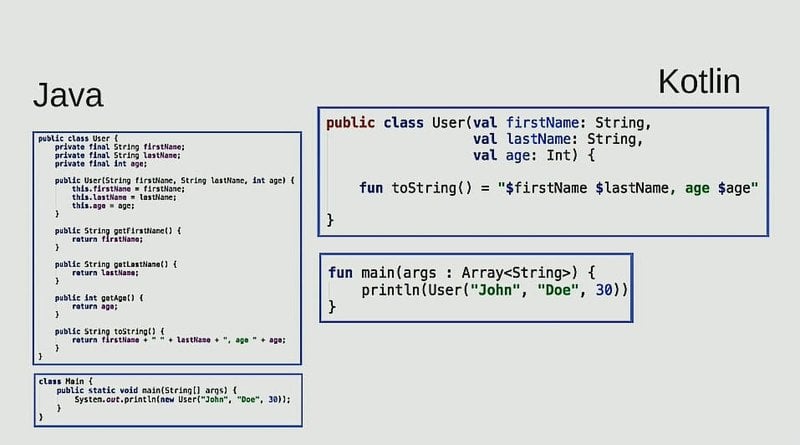
opportunities and reduce cost by a large factor. Our editors have
worked very hard to put together this list. Hopefully, these Kotlin
interview questions will help you get your next mobile app
developer position easily.
1. What is Kotlin?
Kotlin is a robust programming language developed to run on top
of the JVM(Java Virtual Machine)[2]. It is developed by
Jetbrains, a popular IT company famous for building top-quality
development tools. Kotlin is statically typed and offers
exceptional support for functional programming.
Additionally, Kotlin addresses some glaring issues faced by many
Java programmers such as null-based errors. It can be used for
developing both Android and iOS apps alongside general-purpose
software. Due to its extreme compatibility with Java, developers
can write new features for their Java-based applications directly
in Kotlin.
2. Is Kotlin better than Java?
Often employers ask such questions to measure the depth of job
seekers. Since comparing two languages can never bear fruitful
results, you should instead discuss their individual pros and cons
for demonstrating your expertise. Java is still a better language
for building enterprise-grade consumer applications due to its
massive feature list and unending community support.
However, despite being a new language, Kotlin interoperates
nicely with Java. It allows developers to create innovative
applications without writing hundreds of lines of code. Kotlin’s
strong type inferences make it a solid choice for developing
next-generation apps. Moreover, since it can be also used for
developing iOS apps, developers don’t need to embrace new stacks
anymore.
3. Why Use Kotlin in Mobile App
Development?
Since Kotlin simplifies many syntactical elements of Java, it’s
easier to write concise, well-documented code. Additionally, since
it runs directly on JVM, enterprises hardly need to invest in new
tech stacks. So the cost-benefit adjustment is excellent.
Moreover, Kotlin has already started to replace many Java-based
Android apps, alongside iOS apps written in Swift. This number will
only increase over time and adapting to Kotlin will become a must
for modern enterprises. So, to stay ahead of the competition,
developers should embrace Kotlin today.
4. What are Kotlin’s Best Features?
Some of Kotlin’s best features are-
- It supports both object-oriented and functional programming
paradigm. - It provides easy to use lambda functions that are unavailable
in Java. - Maintaining Kotlin is considerably cheap and provides excellent
fault-tolerance. - Allows developing Node.js applications and JVMs.
- Great support for asynchronous communication.
- Exceptional compatibility with existing Java codes.
5. What is Null Safety in Kotlin?
Kotlin comes with in-built protection against unwanted null
references which allows it to be more fault-tolerant. It thus
allows programs to reduce NullPointerExceptions[3]
during runtime and prevents unwanted program crashes. This is a
common problem faced by most existing Java software and causes
losses costing millions of dollars. This is often coined as
Null Safety among Kotlin developers.
6. Differentiate between Kotlin’s Variable Declaration
Methods
Job seekers are often posed with this issue in their Kotlin
interview questions. Kotlin allows you to declare variables in two
different ways. It exposes the val and var
keyword for this purpose. However, as you will see, they’re quite
different in their working.
var number: Int = 10
number = 15
The first line declares an integer variable called number and
assigns 10 as its value. The second line then replaces this 10 with
a new value of 15. You’ll need to declare variables this way if you
want to change them later down the program.
val number: Int = 10
number = 15
The above code block is, however, invalid and will result in
compilation errors. Kotlin doesn’t allow users to change the value
of variables that were created using the val keyword. You should
use it for declaring values that remain the same throughout your
code.
7. What’s the Problem with Below Code?
val name = "UBUNTU"
val upperCase = name.toUpperCase()

name.inc()
The above code snippet will fail to compile due to type
exception. Kotlin is statically typed and implements strong type
inferences. Since the value of the name variable is a String,
Kotlin assumes that name is also a type of String. Thus the second
line is perfectly valid because the method toUpperCase()
is a String method. The last line, however, tries to perform an
increment operation. This line causes Kotlin to throw a compilation
error since inc() can only work with Int values, not
Strings.
8. What is Nullability in Kotlin?
Many programming languages like C and Java allow variable
declarations without setting initial values. These variables
usually hold a value of type null. If you invoke methods on such
variables later in your program, it will crash in runtime. Kotlin
doesn’t allow programmers to declare variables this way and reduces
null-based crashes significantly.
val name: String = null
Thus, the above line won’t compile in Kotlin. You’ll need to
define variables as nullable if you want it to contain null
values.
val name: String? = null
This time, name can contain either String or null.
9. Does Kotlin Allow Calling Java
Functions?
Yes, Kotlin allows the programmer to call existing Java
procedures from within a Kotlin program. Functions such as the
getter and setter duo are represented as properties. Kotlin assigns
Unit to each void value that comes from a Java function. Thus, the
Unit in Kotlin is simply void in Java code.
You will need to escape some Kotlin keywords in Java though.
Since keywords like is, in, and object are valid identifiers in
Java, you’ll need to escape them in Java libraries using the
backtick (`) character. Additionally, Kotlin implements features
like platform types and annotations to ensure null safety when
calling external Java functions.
10. Describe Kotlin’s Interoperability with
JavaScript
During many Kotlin interview questions, interviewees are asked
about the degree of flexibility Kotlin allows for JavaScript
applications. Kotlin enables Android and iOS devs to seamlessly
target JavaScript. What this means is, you can easily trans-compile
a program written in Kotlin to native JavaScript code. This allows
developers to easily create software for the popular Node.JS platform[4].
Kotlin enables developers to control all elements of JS
programming- such as manipulating the DOM, leveraging graphics,
managing the server-side, and so on. Additionally, you can utilize
Kotlin with existing JS libraries like jQuery, and
React[5]. Visit this guide for
detailed information about Kotlin to JavaScript trans-piling[6].
11. Why Doesn’t Kotlin Feature Explicit Ternary
Conditionals?
Kotlin doesn’t offer any specific ternary operator of the form
c = (a
< b) ? a : b; like Java or C. It omits this option
because you can do the same with the if expression in Kotlin. Since
the above ternary operator is essentially an expression of the form
(condition
? then : else), Kotlin simply allows you to do this using
its standard if keyword.
val c = if (a < b) a else b
This line of code does the same thing in Kotlin as the ternary
operator does in Java. You can also pack blocks inside if-else
branches.
12. What is the Function of the Elvis
Operator?
The Elvis operator in Kotlin allows app developers to handle
null-based exceptions. It is a compelling feature of Kotlin which
enables programmers to reduce runtime crashes by a considerable
margin. Although you can still handle your nulls yourself, the
Elvis operator makes it relatively straightforward.
val z = x ?: return y
In this line, z will only contain the value of x if it is not
null. Otherwise, the entire expression will halt executing and
return y. It works since the return statement is also an
expression. So, Elvis operator’s look like a ?:
b in Kotlin.
13. Explain the Workings of when in
Kotlin
During many Kotlin interview questions, job seekers face
questions on conditional statements. Apart from the traditional
if-else, Kotlin features another conditional construct called when.
You can think of it as a replacement for the switch construct
available in C and other popular programming languages[7]. However, in Kotlin,
when is an expression; while the switch is a statement in C.
val number = true
val final = when(number) {
true -> println("It is indeed true!")
false -> println("Oops! false")
}
We demonstrated a simple example using boolean expressions.
You’ll find this handy when working with exceptionally large
conditional branches.
14. What is Smart Casting in Kotlin?
Smart cast is a simple but useful mechanism that allows
programmers to reduce most null-based errors. The Kotlin compiler
does this by inferring the variables. We’ve witnessed it in a
previous question. Below, we’re illustrating a simple example of
smart casting in Kotlin.
fun test(a: Any) {
        if (a is String) {
            print(a.length)    // a is cast to String by the compiler automatically
        }
}
15. What are Co-Routines in Kotlin?
Kotlin aims at increasing app performance via leveraging
asynchronous execution. Contrary to traditional execution flows,
asynchronous executions don’t get blocked on I/O. It makes Kotlin
ideal for building large-scale IT infrastructures[8]. Take a look at the
below example to understand co-routines more clearly.
import kotlinx.coroutines.*

fun main() {
GlobalScope.launch { // creates a new coroutine and continues
delay(2000L) // non-blocking delay for 2000 milliseconds or 2 sec.
println("Hello")
}
println("World!") // execution continues even while coroutine waits
Thread.sleep(4000L) // block main thread for 4 seconds
}
This program will display the string “World!” before
displaying “Hello”. The program first creates a new
coroutine within the GlobalScope and wait for 2 seconds.
Meanwhile, the main thread will continue and print
“World!”. It will wait for 4 seconds then and after two
seconds, the coroutine will print “Hello”.
16. List Some Features of Kotlin that are Absent in
Java
Sometimes Kotlin interview questions are designed in a way that
helps companies understand the potential of future employees.
Below, we’re listing some functionalities of Kotlin that are simply
unavailable in the Java programming language.
- Null Safety – a flagship feature of Kotlin
- Co-Routines – enables asynchronous programming
- Operator Overloading – a key feature missing in Java
- Smart Casts – allows casting inferences
- Companion Object – another useful functionality
17. What Extension Methods does Kotlin provide to
java.io.File?
Java uses the java.io.File class for providing abstract
representations of file or directory paths. Kotlin offers the below
extension methods to this file –
- bufferedReader() – allows to read the contents of a file and
put them into a buffer - readBytes() – can be used for reading the contents of a file
into a ByteArray - readText() – allows reading file contents and puts them to a
String - forEachLine() – reads a file line by line
- readLines() – line by line reads a file and puts them into a
List
18. How to Migrate Java Code to Kotlin?
It’s possible for us to migrate existing Java codes to Kotlin
easily using the IntelliJ IDEA from JetBrains[9]. The below section
demonstrates how to do this in a sequence.
- Update the build file to support Kotlin compilation
- Open the necessary .java file using IDEA
- Copy all the required code snippets
- Create a Kotlin file ending with .kt
- Paste the code snippets in this Kotlin file
- Enter Yes when IDEA asks if it should convert the Java code to
Kotlin
Visit this official guide[10] to learn more about
this issue.
19. Why doesn’t Kotlin Feature Macros?
Macros are useful in a number of programming scenarios. However,
they tend to create a mess of your project and often confuse new
developers. This is why JetBrains, the developers behind Kotlin
omitted this feature altogether. Moreover, developers often find it
hard to test or optimize codebases that contain a lot of macros.
So, omitting macros is a design decision. Ther developers of Kotlin
are, however, working on features like serialization and compiler
plugins to address some shortcomings of this decision.
20. Explain the Different Constructors in
Kotlin
Kotlin offers two different constructors for initializing class
attributes. It varies from Java in this regard since the latter
only provides a single constructor. These two constructors are
known as primary constructors and secondary constructors in Kotlin.
During many Kotlin interview questions, job seekers are asked to
point out the differences between these two.
- Primary Constructor – resides in the class declaration
header - Secondary Constructor – declared inside Kotlin class body and
may have multiple instances
21. Is It Possible to Execute Kotlin Code without
JVM?
As we’ve mentioned many times already, Kotlin compiles into
bytecode and runs on top of the Java Virtual Machine(JVM). However,
it’s also possible to compile Kotlin into native machine code and
thus execute successfully without requiring any JVM at all.
Developers can use the Kotlin/Native tool for doing this
effortlessly. It’s an effective LLVM backend that allows us to
create standalone executables. It exposes some additional
functionalities as well. Consult their official documentation[11] for more
information.
22. How do Ranges Work in Kotlin?
Ranges allow our programs to seamlessly iterate over a list or
progression. It’s one of the many iterators available in Kotlin and
enhances the readability of your program. The below code snippets
demonstrate some basic functions of Kotlin ranges.
for (i in 1..5) {
print(i) // prints 12345 as output
}

val x = 6
for (i in 1..10){
if( i!=x ) continue
print(i) // prints only 6
}
23. Explain the Structural Expressions of
Kotlin
Kotlin has three different structural expressions – namely
return, break, and continue. We’re discussing each one of them with
short notes.
- return – this expression halts the program execution and
returns from the enclosing function - break – it is used for terminating the nearest enclosing loop
in Kotlin - continue – it allows the execution to proceed to the next
iteration without performing the current operation
The second snippet of the previous example prints the value 6
since we’ve used continue.
If we had used break
instead, it would print nothing.
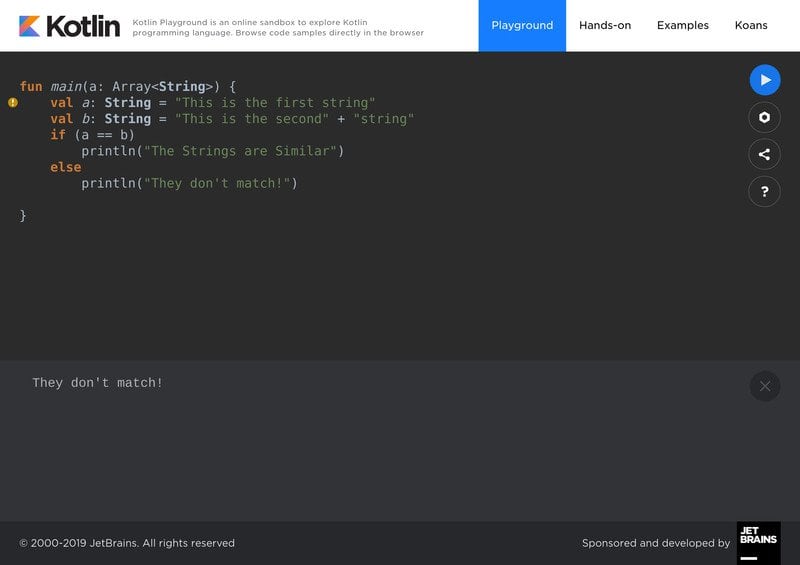
24. How to Compare Two Strings in Kotlin?
String processing comprises an essential portion of any app
development. Interviewees are often asked how to handle this during
Kotlin interview questions. You can use the equality operator ‘==’
to do this, as demonstrated by the following example.
val a: String = "This is the first string"
val b: String = "This is the second" + "string"
if (a == b) println("The Strings are Similar")
else println("They don't match!")
Additionally, you can use the compareTo() function for
comparing strings in Kotlin.
25. Describe For Loops in Kotlin
Loops are a crucial programming construct that allows us to
iterate over things as our program requires. Kotlin features all
the commonly used loops such as for, while, and do-while. We’re
describing the for loop in a nutshell in the following section.
val sports = listOf("cricket", "football", "basketball")
for (sport in sports) { // for loop
println("Let's play $sport!")
}
The above snippet illustrates the use of the for loop in Kotlin.
It’s quite similar to Python and Ruby.
26. Describe While and Do-While Loops
The while and do-while loops work quite similar but have a
specific distinction. The do-while loop executes at least once,
even if the first conditional expression is returned as false.
Contrary to this, while loops will stop execution if the loop isn’t
true at a given time.
var i = 1
while (i < 5) { // while loop
println(i)
i++
}
This code will print the numbers 1 to 4 and then terminate. Now,
take a look at the below do-while snippet.
var i = 6
do{ // do-while
println(i)
i++
}while(i<5)
Although the condition to while is false, it will print the
number 6 as its output. This happens since the execution of the do
block takes place without checking the condition first.
27. What are the Kotlin Data Classes?
Kotlin offers a convenient way of storing values by means of the
data class. A data class comes with many useful in-built methods
such as for copying, string representations, instance collections,
and so on. Data classes are defined using the data modifier. Some
auto-generated methods available to a newly created data class are
– toString, equals, copy,
hashCode, and componentN functions. The first
method returns a string representation, equals check for equality
among properties, and copy allows cloning.
28. What are Kotlin Sealed Classes?
Sealed classes are another extremely useful feature of this
modern-day programming language[12]. They can be used to
restrict the inheritance hierarchy of a class. All you need to do
is define a class as sealed, and nobody will be able to create
subclasses that belong to this sealed class.
These classes will come in handy when you use them inside
when
expressions. If you can perfectly cover all possible cases, you
won’t have to use the else clause. However, remember that sealed
classes are abstract by themselves and you can not instantiate one
directly.
29. How to Create Volatile Variables?
Volatile variables are a compelling feature that enables
programmers to control threads, and CPU time more effectively.
Declaring a variable as volatile is quite easy and differs slightly
than from Java.
@Volatile var name:String = "something"
Actually, volatile is not a keyword in Kotlin, as opposed to
Java. Rather it is an annotation and makes each data write visible
to all other threads immediately.
30. What is the Purpose of Object
Keyword?
Kotlin provides an additional keyword called object
alongside its standard object-oriented features. Contrary to the
traditional object-oriented paradigm where you define a class and
create as many of its instances as you require, the object keyword
allows you to create a single, lazy instance. The compiler will
create this object when you access it in your Kotlin program. The
following program provides a simple illustration.
fun calcRent(normalRent: Int, holidayRent: Int): Unit {
val rates = object{
var normal: Int = 30 * normalRent
var holiday: Int = 30 * holidayRent
}

val total = rates.normal + rates.holiday
print("Total Rent: $$total")
}

fun main() {
calcRent(10, 2)
}
31. Explain the Class Modifiers in Kotlin
During most Kotlin interview questions, employers like to test
job seekers on their grasp of classes and other object-oriented
programming constructs. Class modifiers allow developers to
customize their class declarations as they need it. We’re
demonstrating the four modifiers Kotlin exposes to programmers for
this purpose.
- private – the class declaration is only visible inside the file
that contains it - public – these class declarations are visible everywhere, it’s
the default in Kotlin - protected – makes the class unavailable for top-level Kotlin
declarations - internal – makes the declaration available for all the same
modules
32. Explain the Fundamental Data Types of
Kotlin
Kotlin data types define the procedures available on some data.
The compiler allocates memory space for variables using their data
type. Like many popular programming
languages[13], Kotlin features some
often-used data types. Take a look at the below section for a short
overview of various Kotlin data types.
- integers – contrary to Python, Kotlin has limited size for
integers; available integer types are Long, Int, Short, and
Byte - floats – floating-point values contain fractional values; they
can be declared using Float or Double - characters – represented by the Char modifier; usually hold a
single Unicode character - strings – they are created using the String type and are
immutable like in Java - booleans – represents the boolean values true and false
- arrays – arrays in Kotlin are represented using the Array
class
33. How do String Interpolations Work in
Kotlin?
String interpolations work with multiple placeholders and first
evaluate their value to display the final string output. This final
output will contain the corresponding values of the placeholders.
The below code snippet will illustrate a simple example of Kotlin
string interpolation.
  fun main(args: Array<String>) { // String Interpolation
print("Please enter your name here:")
val name:String? = readLine()
print("Hello, $name!")
}
Here, the Kotlin compiler first receives the user input and
interpolates this value in place of the placeholder $name.
The last line of the snippet is translated by the compiler as shown
below –
new StringBuilder().append("Hello, ").append(name).append("!").toString()
34. How to Convert Strings to Integer?
It’s common for app developers to convert string to int for
various reasons. Kotlin allows you to go about this in multiple
ways. Below we’re demonstrating a simple Kotlin program for this
purpose.
fun main(args: Array<String>) {
    for (string in args) {
        try {
            val parsedValue = string.toInt()
            println("The parsed integer value is $parsedInt")
       } catch (nfe: NumberFormatException) {
            // not a valid int
       }
   }
}
You can also do this without using explicit try-catch blocks.
For this, you’ll need to utilize the toIntOrNull()
method.
35. What’s the Difference Between const and
val?
Earlier we illustrated how to create variables that only contain
fixed data using the val
keyword. However, Kotlin offers the const
keyword for creating constants like the C programming language. The
key difference between val and const is their execution phase.
Kotlin sets the properties of val at runtime by default. On the
other hand, const is set by the compiler during the program’s
compiler time.
const val str = "Fixed string!" // global variable
fun main(args: Array<String>) {
const val x = 4
const val str = "New string.." // local variable
}
Additionally, you can not use const inside the local scope, thus
the above code block will fail to compile. This modifier is also
not applicable on var.
36. What’s the Entry Point for Kotlin
Programs?
Kotlin, like many popular programming languages, relies on a
specific entry point. The main() function is this point,
similar to other OOP languages such as C++ and Java. Developers can
easily define the command-line arguments taken by Kotlin programs.
For this, you’ll need to pass args: Array<String> to
this main() function.
It takes a somewhat different syntax than traditional Java
programs. Below we’re illustrating the differences between the
main() function in both Java and Kotlin. You can easily
compare them for a better understanding.
public static void main(String[] args) // Entry to Java Programs

fun main(args: Array<String>) // Entry to Kotlin Programs
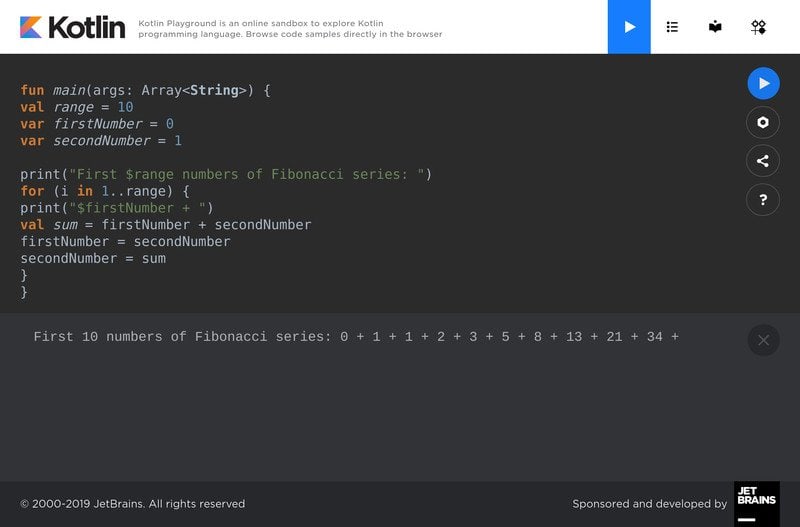
37. Write a Kotlin Program to Display the Fibonacci
Series
Most Kotlin interview questions aim to find out the knowledge of
the candidates for practical problems. The Fibonacci series[14] is a common question
faced by job seekers in many Kotlin interviews. It’s a mathematical
sequence of numbers where each number is the sum of its previous
two numbers.
fun main(args: Array<String>) {
val range = 10
var firstNumber = 0
var secondNumber = 1

print("First $range numbers of Fibonacci series: ")
for (i in 1..range) {
print("$firstNumber + ")
val sum = firstNumber + secondNumber
firstNumber = secondNumber
secondNumber = sum
}
}
We’ve used a for loop for computing this series. However, you
can solve this problem by using several strategies.
38. Write a Program for Determining if a Number is
Prime or Not
Prime numbers play a major role in modern computing,
particularly in number theory. Software developers usually use them
to implement safe encryption mechanisms for their applications.
We’re illustrating a simple Kotlin program that determines whether
a particular number is prime or not.
fun main( args: Array<String> ) {
print("Enter the number:")
var num = readLine()!!.toIntOrNull()
var flag = false

if( num != null ){
for (i in 2..num / 2) {
if (num % i == 0) {
flag = true
break
}
}
}
if (flag)
println("$num is not a prime number.")
else
println("$num is a prime number.")
}
39. Write a Program for Finding the Sum of Natural
Numbers
Natural numbers are all positive values starting from 1. The sum
of these numbers can be easily calculated using the Kotlin’s loop
constructs. Below, we’re demonstrating a simple program that takes
user input and calculates the sum of all natural numbers up to that
point.
fun main( args: Array<String> ) {
print("Enter the number:")
var num = readLine()!!.toIntOrNull()
var sum = 0 // inital value of summation

if( num != null ){
for (i in 1..num) {
sum += i
}
println("Sum = $sum")
}
}
40. Explain the Differences Between ? and !! in Terms
of Null Safety
Kotlin provides two different mechanisms for unwrapping the
contents of a nullable type. The Elvis operator ‘?’ provides a safe
call and doesn’t crash your program if the content is of type null.
However, on the other hand, !! is used for force unwrapping the
contents of a nullable variable. This is performed during runtime
and thus may lead to a potential system crash if the value returned
is null. So, you should only use the !! modifier when you’re
certain about the value of your variables.
41. Find Factorial of Numbers using
Recursion
The factorial of a number is defined as the product of all
numbers starting at 1 and up to that number. We can easily write a
Kotlin program to do this job using either loops or recursion. The
latter is a divide and conquer programming strategy which divides a
routine into multiple similar but small sub-routines.
fun main(args: Array<String>) {
print("Enter the number:")
val number = readLine()?.toInt()
if(number != null ){
val factorial = multiplyNums(number)
println("Factorial of $number = $factorial")
}
}
fun multiplyNums(number: Int): Long {
if (number >= 1)
return number * multiplyNums(number - 1) // recursive call to multiplyNums
else
return 1
}
42. What is Kotlin Multiplatform?
Kotlin developers continue to roll out new and exciting features
for developers. The multiplatform feature is one such experimental
feature that enables programmers to share code between several
platforms such as JavaScript, iOS, and desktop apps.
This is becoming increasingly popular among modern developers
because it reduces the amount of code by a considerable factor. You
can use much of the same codebase for writing apps for different
platforms thanks to this feature. Simply create a shared module for
your apps and list the dependencies. Now, you can create separate
modules for different platforms and integrate the core
functionalities using the common module.
43. How do Lambda Functions Work in
Kotlin?
A lambda function is a small, self-contained block of code that
can be passed around your program for greater flexibility. They’re
usually written inline and solve basic but frequent programming
tasks. We take a closer look at some simple Kotlin lambda functions
to understand it in more detail.
fun main(args: Array<String>) {
val greet = { println("Hello!")} // first lambda function
greet()

val product = { x: Int, y: Int -> x * y } // second lambda function
val result = product(3, 5)
println("Product of two numbers: $result")
}
The first lambda greets the user with the text “Hello” while the
second one returns the product of two numbers. Lambda functions are
anonymous, meaning they don’t have any names.
44. Explain Why the Following Code Fails to
Compile
class A{
}
class B : A(){
}
Classes in Kotlin are final by default. So, you can not inherit
the attributes of the first class A from the second class B. You
will need to declare the first class as open for solving this
issue. The below snippet will illustrate this for you.
open class A{
}
class B : A(){
}
Now, this code will compile just fine and execute as expected.
Kotlin exposes this open
modifier to allow flexible yet secure class inheritances.
45. How do Destructuring Declarations Work in
Kotlin?
Kotlin allows developers to assign multiple values to variables
from data stored in objects or arrays. It’s a very smart feature
and employers often ask about this during Kotlin interview
questions. We’re demonstrating a quick example below to help you
understand this concept more clearly.
data class Book(val name: String, val publication: String){
}

fun main(args: Array<String>) {
val (name, publication) = Book("Kotlin for Dummies", "O’Reilly")
println(name)
println(publication)
}
When compiled, this program will return the name and publication
of the book from the specified data class. The destructuring takes
place in the first line inside the main function.
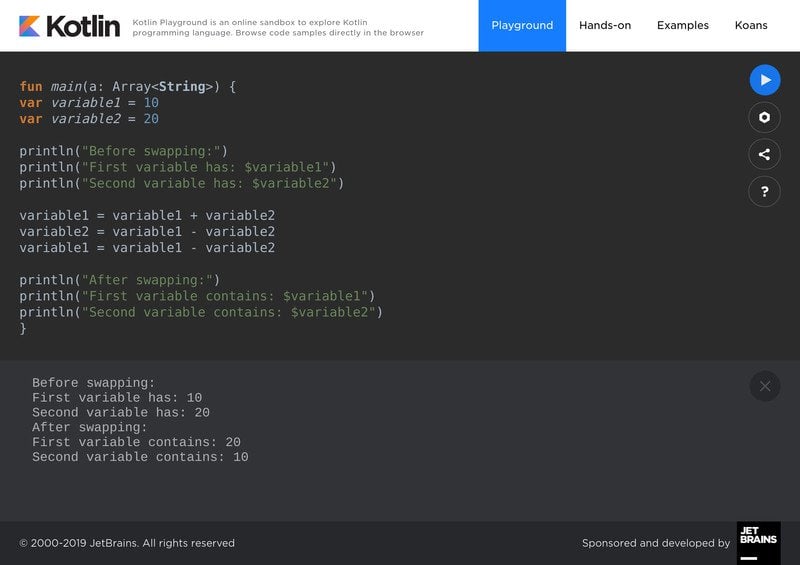
46. Write a Program to Swap Two Numbers Without Using
Temporary Variables
Swapping two numbers using a temporary variable is a common
practice for many. However, we can easily swap values among
variables without using any such variables. Take a look at the
below Kotlin program to find out how to do this in action.
fun main(a: Array<String>) {
var variable1 = 10
var variable2 = 20

println("Before swapping:")
println("First variable has: $variable1")
println("Second variable has: $variable2")

variable1 = variable1 + variable2
variable2 = variable1 - variable2
variable1 = variable1 - variable2

println("After swapping:")
println("First variable contains: $variable1")
println("Second variable contains: $variable2")
}
47. What is Any, Unit, and Nothing?
In Kotlin, any is a data type that represents basic types like
integer, floats, and strings. Any type can not hold any null values
by default and implements automatic casting of lower types. This is
similar to the Java object java.Lang.Object.
The unit type is a type that is returned by function calls that
don’t return anything. Kotlin doesn’t offer void functions like C
or Java do and utilizes unit for this purpose. You can
think of unit as nothing but one specific instance.
The nothing type is returned by Kotlin functions when they can’t
reach the bottom of the function. It usually happens due to
infinite loops or recursions.
48. Write a Kotlin Program for Calculating the Power of
a Number
Many programming logic uses the power of a number for achieving
its end goal. Thankfully, calculating the power of a given number
is effortless in Kotlin. The below program demonstrates a simple
program for this purpose. It is based on recursion.
fun main(args: Array<String>) {
print("Enter the base:")
val base = readLine()!!.toInt()
print("Enter the power:")
val power = readLine()!!.toInt()
val result = powerRaised(base, power)
println("$base^$power = $result")
}

fun powerRaised(base: Int, power: Int): Int {
if (power != 0)
return base * powerRaised(base, power - 1)
else
return 1
}
49. How do You Create Static Methods in
Kotlin?
Static methods are useful for a number of reasons. They allow
programmers to prevent the copying of methods and allow working
with them without creating an object first. Kotlin doesn’t feature
the widely used static keyword found in Java. Rather, you’ll need
to create a companion object. Below, we’re comparing the creation
of static methods in both Java and Kotlin. Hopefully, they will
help you understand them better.
class A {
public static int returnMe() { return 5; } // Java
}

class A {
companion object {
fun a() : Int = 5 // Kotlin
}
}
50. How to Create Arrays of Different Types in
Kotlin
Kotlin allows programmers to easily create different types of
arrays using the arrayOf() method. Below, we’ll take a
look at how to create arrays containing integer, floats, and
strings using this simple but robust procedure.
val arr1 = arrayOf(1, 2, 3)
val arr2 = arrayOf(1.2, 2.3, 3.4)
val arr3 = arrayOf("Hello", "String", "Array)
Ending Thoughts
Kotlin interview questions may reflect a lot of topics including
basic programming constructs and real-life problem-solving.
Although it’s impossible to encapsulate all questions for high computer science jobs[15] that require Kotlin in
a single guide, our editors have tried their best to outline the
essentials. We encourage you to try out the various programming
examples demonstrated in this guide to have a better grasp on
Kotlin. Additionally, you should try to understand the basics as
much as possible. By the end of this guide, you should possess
considerable knowledge of Kotlin. If you have any questions, please
leave them in our comment section.
References
- ^
Google
announced official support
(blog.jetbrains.com) - ^
JVM(Java
Virtual Machine) (en.wikipedia.org) - ^
NullPointerExceptions
(stackoverflow.com) - ^
the
popular Node.JS platform
(www.ubuntupit.com) - ^
JS
libraries like jQuery, and React
(www.ubuntupit.com) - ^
Kotlin
to JavaScript trans-piling (kotlinlang.org) - ^
popular
programming languages (www.ubuntupit.com) - ^
large-scale IT infrastructures
(www.ubuntupit.com) - ^
IntelliJ IDEA from JetBrains
(www.jetbrains.com) - ^
Visit
this official guide (kotlinlang.org) - ^
official documentation
(kotlinlang.org) - ^
modern-day programming language
(www.ubuntupit.com) - ^
many
popular programming languages
(www.ubuntupit.com) - ^
Fibonacci series
(www.mathsisfun.com) - ^
high
computer science jobs (www.ubuntupit.com)
Kotlin has become a hot topic for developers since the day
Google announced official support[1] for it alongside Java.
It can be used for developing modern Android and iOS apps without
getting distracted by issues like ecosystem and portability. So, if
you’re a Java developer looking to break into iOS development,
Kotlin can also be the ideal solution. Due to its rising
popularity, enterprises are lined after Kotlin experts. If you want
to get a job as a mobile app developer at renowned
companies, you’ll need to master some essential Kotlin interview
questions. We’ve curated this well-thought guide to help you get
started with Kotlin and increase your job opportunities.
Essential Kotlin Interview Questions in
2020
There’s
no doubt that tech companies will continue to increase hiring
Kotlin developers. Since you can develop both Android and iOS
applications using Kotlin, it will increase development
opportunities and reduce cost by a large factor. Our editors have
worked very hard to put together this list. Hopefully, these Kotlin
interview questions will help you get your next mobile app
developer position easily.
1. What is Kotlin?
Kotlin is a robust programming language developed to run on top
of the JVM(Java Virtual Machine)[2]. It is developed by
Jetbrains, a popular IT company famous for building top-quality
development tools. Kotlin is statically typed and offers
exceptional support for functional programming.
Additionally, Kotlin addresses some glaring issues faced by many
Java programmers such as null-based errors. It can be used for
developing both Android and iOS apps alongside general-purpose
software. Due to its extreme compatibility with Java, developers
can write new features for their Java-based applications directly
in Kotlin.
2. Is Kotlin better than Java?
Often employers ask such questions to measure the depth of job
seekers. Since comparing two languages can never bear fruitful
results, you should instead discuss their individual pros and cons
for demonstrating your expertise. Java is still a better language
for building enterprise-grade consumer applications due to its
massive feature list and unending community support.
However, despite being a new language, Kotlin interoperates
nicely with Java. It allows developers to create innovative
applications without writing hundreds of lines of code. Kotlin’s
strong type inferences make it a solid choice for developing
next-generation apps. Moreover, since it can be also used for
developing iOS apps, developers don’t need to embrace new stacks
anymore.
3. Why Use Kotlin in Mobile App
Development?
Since Kotlin simplifies many syntactical elements of Java, it’s
easier to write concise, well-documented code. Additionally, since
it runs directly on JVM, enterprises hardly need to invest in new
tech stacks. So the cost-benefit adjustment is excellent.
Moreover, Kotlin has already started to replace many Java-based
Android apps, alongside iOS apps written in Swift. This number will
only increase over time and adapting to Kotlin will become a must
for modern enterprises. So, to stay ahead of the competition,
developers should embrace Kotlin today.
4. What are Kotlin’s Best Features?
Some of Kotlin’s best features are-
- It supports both object-oriented and functional programming
paradigm. - It provides easy to use lambda functions that are unavailable
in Java. - Maintaining Kotlin is considerably cheap and provides excellent
fault-tolerance. - Allows developing Node.js applications and JVMs.
- Great support for asynchronous communication.
- Exceptional compatibility with existing Java codes.
5. What is Null Safety in Kotlin?
Kotlin comes with in-built protection against unwanted null
references which allows it to be more fault-tolerant. It thus
allows programs to reduce NullPointerExceptions[3]
during runtime and prevents unwanted program crashes. This is a
common problem faced by most existing Java software and causes
losses costing millions of dollars. This is often coined as
Null Safety among Kotlin developers.
6. Differentiate between Kotlin’s Variable Declaration
Methods
Job seekers are often posed with this issue in their Kotlin
interview questions. Kotlin allows you to declare variables in two
different ways. It exposes the val and var
keyword for this purpose. However, as you will see, they’re quite
different in their working.
var number: Int = 10
number = 15
The first line declares an integer variable called number and
assigns 10 as its value. The second line then replaces this 10 with
a new value of 15. You’ll need to declare variables this way if you
want to change them later down the program.
val number: Int = 10
number = 15
The above code block is, however, invalid and will result in
compilation errors. Kotlin doesn’t allow users to change the value
of variables that were created using the val keyword. You should
use it for declaring values that remain the same throughout your
code.
7. What’s the Problem with Below Code?
val name = "UBUNTU"
val upperCase = name.toUpperCase()

name.inc()
The above code snippet will fail to compile due to type
exception. Kotlin is statically typed and implements strong type
inferences. Since the value of the name variable is a String,
Kotlin assumes that name is also a type of String. Thus the second
line is perfectly valid because the method toUpperCase()
is a String method. The last line, however, tries to perform an
increment operation. This line causes Kotlin to throw a compilation
error since inc() can only work with Int values, not
Strings.
8. What is Nullability in Kotlin?
Many programming languages like C and Java allow variable
declarations without setting initial values. These variables
usually hold a value of type null. If you invoke methods on such
variables later in your program, it will crash in runtime. Kotlin
doesn’t allow programmers to declare variables this way and reduces
null-based crashes significantly.
val name: String = null
Thus, the above line won’t compile in Kotlin. You’ll need to
define variables as nullable if you want it to contain null
values.
val name: String? = null
This time, name can contain either String or null.
9. Does Kotlin Allow Calling Java
Functions?
Yes, Kotlin allows the programmer to call existing Java
procedures from within a Kotlin program. Functions such as the
getter and setter duo are represented as properties. Kotlin assigns
Unit to each void value that comes from a Java function. Thus, the
Unit in Kotlin is simply void in Java code.
You will need to escape some Kotlin keywords in Java though.
Since keywords like is, in, and object are valid identifiers in
Java, you’ll need to escape them in Java libraries using the
backtick (`) character. Additionally, Kotlin implements features
like platform types and annotations to ensure null safety when
calling external Java functions.
10. Describe Kotlin’s Interoperability with
JavaScript
During many Kotlin interview questions, interviewees are asked
about the degree of flexibility Kotlin allows for JavaScript
applications. Kotlin enables Android and iOS devs to seamlessly
target JavaScript. What this means is, you can easily trans-compile
a program written in Kotlin to native JavaScript code. This allows
developers to easily create software for the popular Node.JS platform[4].
Kotlin enables developers to control all elements of JS
programming- such as manipulating the DOM, leveraging graphics,
managing the server-side, and so on. Additionally, you can utilize
Kotlin with existing JS libraries like jQuery, and
React[5]. Visit this guide for
detailed information about Kotlin to JavaScript trans-piling[6].
11. Why Doesn’t Kotlin Feature Explicit Ternary
Conditionals?
Kotlin doesn’t offer any specific ternary operator of the form
c = (a
< b) ? a : b; like Java or C. It omits this option
because you can do the same with the if expression in Kotlin. Since
the above ternary operator is essentially an expression of the form
(condition
? then : else), Kotlin simply allows you to do this using
its standard if keyword.
val c = if (a < b) a else b
This line of code does the same thing in Kotlin as the ternary
operator does in Java. You can also pack blocks inside if-else
branches.
12. What is the Function of the Elvis
Operator?
The Elvis operator in Kotlin allows app developers to handle
null-based exceptions. It is a compelling feature of Kotlin which
enables programmers to reduce runtime crashes by a considerable
margin. Although you can still handle your nulls yourself, the
Elvis operator makes it relatively straightforward.
val z = x ?: return y
In this line, z will only contain the value of x if it is not
null. Otherwise, the entire expression will halt executing and
return y. It works since the return statement is also an
expression. So, Elvis operator’s look like a ?:
b in Kotlin.
13. Explain the Workings of when in
Kotlin
During many Kotlin interview questions, job seekers face
questions on conditional statements. Apart from the traditional
if-else, Kotlin features another conditional construct called when.
You can think of it as a replacement for the switch construct
available in C and other popular programming languages[7]. However, in Kotlin,
when is an expression; while the switch is a statement in C.
val number = true
val final = when(number) {
true -> println("It is indeed true!")
false -> println("Oops! false")
}
We demonstrated a simple example using boolean expressions.
You’ll find this handy when working with exceptionally large
conditional branches.
14. What is Smart Casting in Kotlin?
Smart cast is a simple but useful mechanism that allows
programmers to reduce most null-based errors. The Kotlin compiler
does this by inferring the variables. We’ve witnessed it in a
previous question. Below, we’re illustrating a simple example of
smart casting in Kotlin.
fun test(a: Any) {
        if (a is String) {
            print(a.length)    // a is cast to String by the compiler automatically
        }
}
15. What are Co-Routines in Kotlin?
Kotlin aims at increasing app performance via leveraging
asynchronous execution. Contrary to traditional execution flows,
asynchronous executions don’t get blocked on I/O. It makes Kotlin
ideal for building large-scale IT infrastructures[8]. Take a look at the
below example to understand co-routines more clearly.
import kotlinx.coroutines.*

fun main() {
GlobalScope.launch { // creates a new coroutine and continues
delay(2000L) // non-blocking delay for 2000 milliseconds or 2 sec.
println("Hello")
}
println("World!") // execution continues even while coroutine waits
Thread.sleep(4000L) // block main thread for 4 seconds
}
This program will display the string “World!” before
displaying “Hello”. The program first creates a new
coroutine within the GlobalScope and wait for 2 seconds.
Meanwhile, the main thread will continue and print
“World!”. It will wait for 4 seconds then and after two
seconds, the coroutine will print “Hello”.
16. List Some Features of Kotlin that are Absent in
Java
Sometimes Kotlin interview questions are designed in a way that
helps companies understand the potential of future employees.
Below, we’re listing some functionalities of Kotlin that are simply
unavailable in the Java programming language.
- Null Safety – a flagship feature of Kotlin
- Co-Routines – enables asynchronous programming
- Operator Overloading – a key feature missing in Java
- Smart Casts – allows casting inferences
- Companion Object – another useful functionality
17. What Extension Methods does Kotlin provide to
java.io.File?
Java uses the java.io.File class for providing abstract
representations of file or directory paths. Kotlin offers the below
extension methods to this file –
- bufferedReader() – allows to read the contents of a file and
put them into a buffer - readBytes() – can be used for reading the contents of a file
into a ByteArray - readText() – allows reading file contents and puts them to a
String - forEachLine() – reads a file line by line
- readLines() – line by line reads a file and puts them into a
List
18. How to Migrate Java Code to Kotlin?
It’s possible for us to migrate existing Java codes to Kotlin
easily using the IntelliJ IDEA from JetBrains[9]. The below section
demonstrates how to do this in a sequence.
- Update the build file to support Kotlin compilation
- Open the necessary .java file using IDEA
- Copy all the required code snippets
- Create a Kotlin file ending with .kt
- Paste the code snippets in this Kotlin file
- Enter Yes when IDEA asks if it should convert the Java code to
Kotlin
Visit this official guide[10] to learn more about
this issue.
19. Why doesn’t Kotlin Feature Macros?
Macros are useful in a number of programming scenarios. However,
they tend to create a mess of your project and often confuse new
developers. This is why JetBrains, the developers behind Kotlin
omitted this feature altogether. Moreover, developers often find it
hard to test or optimize codebases that contain a lot of macros.
So, omitting macros is a design decision. Ther developers of Kotlin
are, however, working on features like serialization and compiler
plugins to address some shortcomings of this decision.
20. Explain the Different Constructors in
Kotlin
Kotlin offers two different constructors for initializing class
attributes. It varies from Java in this regard since the latter
only provides a single constructor. These two constructors are
known as primary constructors and secondary constructors in Kotlin.
During many Kotlin interview questions, job seekers are asked to
point out the differences between these two.
- Primary Constructor – resides in the class declaration
header - Secondary Constructor – declared inside Kotlin class body and
may have multiple instances
21. Is It Possible to Execute Kotlin Code without
JVM?
As we’ve mentioned many times already, Kotlin compiles into
bytecode and runs on top of the Java Virtual Machine(JVM). However,
it’s also possible to compile Kotlin into native machine code and
thus execute successfully without requiring any JVM at all.
Developers can use the Kotlin/Native tool for doing this
effortlessly. It’s an effective LLVM backend that allows us to
create standalone executables. It exposes some additional
functionalities as well. Consult their official documentation[11] for more
information.
22. How do Ranges Work in Kotlin?
Ranges allow our programs to seamlessly iterate over a list or
progression. It’s one of the many iterators available in Kotlin and
enhances the readability of your program. The below code snippets
demonstrate some basic functions of Kotlin ranges.
for (i in 1..5) {
print(i) // prints 12345 as output
}

val x = 6
for (i in 1..10){
if( i!=x ) continue
print(i) // prints only 6
}
23. Explain the Structural Expressions of
Kotlin
Kotlin has three different structural expressions – namely
return, break, and continue. We’re discussing each one of them with
short notes.
- return – this expression halts the program execution and
returns from the enclosing function - break – it is used for terminating the nearest enclosing loop
in Kotlin - continue – it allows the execution to proceed to the next
iteration without performing the current operation
The second snippet of the previous example prints the value 6
since we’ve used continue.
If we had used break
instead, it would print nothing.
24. How to Compare Two Strings in Kotlin?
String processing comprises an essential portion of any app
development. Interviewees are often asked how to handle this during
Kotlin interview questions. You can use the equality operator ‘==’
to do this, as demonstrated by the following example.
val a: String = "This is the first string"
val b: String = "This is the second" + "string"
if (a == b) println("The Strings are Similar")
else println("They don't match!")
Additionally, you can use the compareTo() function for
comparing strings in Kotlin.
25. Describe For Loops in Kotlin
Loops are a crucial programming construct that allows us to
iterate over things as our program requires. Kotlin features all
the commonly used loops such as for, while, and do-while. We’re
describing the for loop in a nutshell in the following section.
val sports = listOf("cricket", "football", "basketball")
for (sport in sports) { // for loop
println("Let's play $sport!")
}
The above snippet illustrates the use of the for loop in Kotlin.
It’s quite similar to Python and Ruby.
26. Describe While and Do-While Loops
The while and do-while loops work quite similar but have a
specific distinction. The do-while loop executes at least once,
even if the first conditional expression is returned as false.
Contrary to this, while loops will stop execution if the loop isn’t
true at a given time.
var i = 1
while (i < 5) { // while loop
println(i)
i++
}
This code will print the numbers 1 to 4 and then terminate. Now,
take a look at the below do-while snippet.
var i = 6
do{ // do-while
println(i)
i++
}while(i<5)
Although the condition to while is false, it will print the
number 6 as its output. This happens since the execution of the do
block takes place without checking the condition first.
27. What are the Kotlin Data Classes?
Kotlin offers a convenient way of storing values by means of the
data class. A data class comes with many useful in-built methods
such as for copying, string representations, instance collections,
and so on. Data classes are defined using the data modifier. Some
auto-generated methods available to a newly created data class are
– toString, equals, copy,
hashCode, and componentN functions. The first
method returns a string representation, equals check for equality
among properties, and copy allows cloning.
28. What are Kotlin Sealed Classes?
Sealed classes are another extremely useful feature of this
modern-day programming language[12]. They can be used to
restrict the inheritance hierarchy of a class. All you need to do
is define a class as sealed, and nobody will be able to create
subclasses that belong to this sealed class.
These classes will come in handy when you use them inside
when
expressions. If you can perfectly cover all possible cases, you
won’t have to use the else clause. However, remember that sealed
classes are abstract by themselves and you can not instantiate one
directly.
29. How to Create Volatile Variables?
Volatile variables are a compelling feature that enables
programmers to control threads, and CPU time more effectively.
Declaring a variable as volatile is quite easy and differs slightly
than from Java.
@Volatile var name:String = "something"
Actually, volatile is not a keyword in Kotlin, as opposed to
Java. Rather it is an annotation and makes each data write visible
to all other threads immediately.
30. What is the Purpose of Object
Keyword?
Kotlin provides an additional keyword called object
alongside its standard object-oriented features. Contrary to the
traditional object-oriented paradigm where you define a class and
create as many of its instances as you require, the object keyword
allows you to create a single, lazy instance. The compiler will
create this object when you access it in your Kotlin program. The
following program provides a simple illustration.
fun calcRent(normalRent: Int, holidayRent: Int): Unit {
val rates = object{
var normal: Int = 30 * normalRent
var holiday: Int = 30 * holidayRent
}

val total = rates.normal + rates.holiday
print("Total Rent: $$total")
}

fun main() {
calcRent(10, 2)
}
31. Explain the Class Modifiers in Kotlin
During most Kotlin interview questions, employers like to test
job seekers on their grasp of classes and other object-oriented
programming constructs. Class modifiers allow developers to
customize their class declarations as they need it. We’re
demonstrating the four modifiers Kotlin exposes to programmers for
this purpose.
- private – the class declaration is only visible inside the file
that contains it - public – these class declarations are visible everywhere, it’s
the default in Kotlin - protected – makes the class unavailable for top-level Kotlin
declarations - internal – makes the declaration available for all the same
modules
32. Explain the Fundamental Data Types of
Kotlin
Kotlin data types define the procedures available on some data.
The compiler allocates memory space for variables using their data
type. Like many popular programming
languages[13], Kotlin features some
often-used data types. Take a look at the below section for a short
overview of various Kotlin data types.
- integers – contrary to Python, Kotlin has limited size for
integers; available integer types are Long, Int, Short, and
Byte - floats – floating-point values contain fractional values; they
can be declared using Float or Double - characters – represented by the Char modifier; usually hold a
single Unicode character - strings – they are created using the String type and are
immutable like in Java - booleans – represents the boolean values true and false
- arrays – arrays in Kotlin are represented using the Array
class
33. How do String Interpolations Work in
Kotlin?
String interpolations work with multiple placeholders and first
evaluate their value to display the final string output. This final
output will contain the corresponding values of the placeholders.
The below code snippet will illustrate a simple example of Kotlin
string interpolation.
  fun main(args: Array<String>) { // String Interpolation
print("Please enter your name here:")
val name:String? = readLine()
print("Hello, $name!")
}
Here, the Kotlin compiler first receives the user input and
interpolates this value in place of the placeholder $name.
The last line of the snippet is translated by the compiler as shown
below –
new StringBuilder().append("Hello, ").append(name).append("!").toString()
34. How to Convert Strings to Integer?
It’s common for app developers to convert string to int for
various reasons. Kotlin allows you to go about this in multiple
ways. Below we’re demonstrating a simple Kotlin program for this
purpose.
fun main(args: Array<String>) {
    for (string in args) {
        try {
            val parsedValue = string.toInt()
            println("The parsed integer value is $parsedInt")
       } catch (nfe: NumberFormatException) {
            // not a valid int
       }
   }
}
You can also do this without using explicit try-catch blocks.
For this, you’ll need to utilize the toIntOrNull()
method.
35. What’s the Difference Between const and
val?
Earlier we illustrated how to create variables that only contain
fixed data using the val
keyword. However, Kotlin offers the const
keyword for creating constants like the C programming language. The
key difference between val and const is their execution phase.
Kotlin sets the properties of val at runtime by default. On the
other hand, const is set by the compiler during the program’s
compiler time.
const val str = "Fixed string!" // global variable
fun main(args: Array<String>) {
const val x = 4
const val str = "New string.." // local variable
}
Additionally, you can not use const inside the local scope, thus
the above code block will fail to compile. This modifier is also
not applicable on var.
36. What’s the Entry Point for Kotlin
Programs?
Kotlin, like many popular programming languages, relies on a
specific entry point. The main() function is this point,
similar to other OOP languages such as C++ and Java. Developers can
easily define the command-line arguments taken by Kotlin programs.
For this, you’ll need to pass args: Array<String> to
this main() function.
It takes a somewhat different syntax than traditional Java
programs. Below we’re illustrating the differences between the
main() function in both Java and Kotlin. You can easily
compare them for a better understanding.
public static void main(String[] args) // Entry to Java Programs

fun main(args: Array<String>) // Entry to Kotlin Programs
37. Write a Kotlin Program to Display the Fibonacci
Series
Most Kotlin interview questions aim to find out the knowledge of
the candidates for practical problems. The Fibonacci series[14] is a common question
faced by job seekers in many Kotlin interviews. It’s a mathematical
sequence of numbers where each number is the sum of its previous
two numbers.
fun main(args: Array<String>) {
val range = 10
var firstNumber = 0
var secondNumber = 1

print("First $range numbers of Fibonacci series: ")
for (i in 1..range) {
print("$firstNumber + ")
val sum = firstNumber + secondNumber
firstNumber = secondNumber
secondNumber = sum
}
}
We’ve used a for loop for computing this series. However, you
can solve this problem by using several strategies.
38. Write a Program for Determining if a Number is
Prime or Not
Prime numbers play a major role in modern computing,
particularly in number theory. Software developers usually use them
to implement safe encryption mechanisms for their applications.
We’re illustrating a simple Kotlin program that determines whether
a particular number is prime or not.
fun main( args: Array<String> ) {
print("Enter the number:")
var num = readLine()!!.toIntOrNull()
var flag = false

if( num != null ){
for (i in 2..num / 2) {
if (num % i == 0) {
flag = true
break
}
}
}
if (flag)
println("$num is not a prime number.")
else
println("$num is a prime number.")
}
39. Write a Program for Finding the Sum of Natural
Numbers
Natural numbers are all positive values starting from 1. The sum
of these numbers can be easily calculated using the Kotlin’s loop
constructs. Below, we’re demonstrating a simple program that takes
user input and calculates the sum of all natural numbers up to that
point.
fun main( args: Array<String> ) {
print("Enter the number:")
var num = readLine()!!.toIntOrNull()
var sum = 0 // inital value of summation

if( num != null ){
for (i in 1..num) {
sum += i
}
println("Sum = $sum")
}
}
40. Explain the Differences Between ? and !! in Terms
of Null Safety
Kotlin provides two different mechanisms for unwrapping the
contents of a nullable type. The Elvis operator ‘?’ provides a safe
call and doesn’t crash your program if the content is of type null.
However, on the other hand, !! is used for force unwrapping the
contents of a nullable variable. This is performed during runtime
and thus may lead to a potential system crash if the value returned
is null. So, you should only use the !! modifier when you’re
certain about the value of your variables.
41. Find Factorial of Numbers using
Recursion
The factorial of a number is defined as the product of all
numbers starting at 1 and up to that number. We can easily write a
Kotlin program to do this job using either loops or recursion. The
latter is a divide and conquer programming strategy which divides a
routine into multiple similar but small sub-routines.
fun main(args: Array<String>) {
print("Enter the number:")
val number = readLine()?.toInt()
if(number != null ){
val factorial = multiplyNums(number)
println("Factorial of $number = $factorial")
}
}
fun multiplyNums(number: Int): Long {
if (number >= 1)
return number * multiplyNums(number - 1) // recursive call to multiplyNums
else
return 1
}
42. What is Kotlin Multiplatform?
Kotlin developers continue to roll out new and exciting features
for developers. The multiplatform feature is one such experimental
feature that enables programmers to share code between several
platforms such as JavaScript, iOS, and desktop apps.
This is becoming increasingly popular among modern developers
because it reduces the amount of code by a considerable factor. You
can use much of the same codebase for writing apps for different
platforms thanks to this feature. Simply create a shared module for
your apps and list the dependencies. Now, you can create separate
modules for different platforms and integrate the core
functionalities using the common module.
43. How do Lambda Functions Work in
Kotlin?
A lambda function is a small, self-contained block of code that
can be passed around your program for greater flexibility. They’re
usually written inline and solve basic but frequent programming
tasks. We take a closer look at some simple Kotlin lambda functions
to understand it in more detail.
fun main(args: Array<String>) {
val greet = { println("Hello!")} // first lambda function
greet()

val product = { x: Int, y: Int -> x * y } // second lambda function
val result = product(3, 5)
println("Product of two numbers: $result")
}
The first lambda greets the user with the text “Hello” while the
second one returns the product of two numbers. Lambda functions are
anonymous, meaning they don’t have any names.
44. Explain Why the Following Code Fails to
Compile
class A{
}
class B : A(){
}
Classes in Kotlin are final by default. So, you can not inherit
the attributes of the first class A from the second class B. You
will need to declare the first class as open for solving this
issue. The below snippet will illustrate this for you.
open class A{
}
class B : A(){
}
Now, this code will compile just fine and execute as expected.
Kotlin exposes this open
modifier to allow flexible yet secure class inheritances.
45. How do Destructuring Declarations Work in
Kotlin?
Kotlin allows developers to assign multiple values to variables
from data stored in objects or arrays. It’s a very smart feature
and employers often ask about this during Kotlin interview
questions. We’re demonstrating a quick example below to help you
understand this concept more clearly.
data class Book(val name: String, val publication: String){
}

fun main(args: Array<String>) {
val (name, publication) = Book("Kotlin for Dummies", "O’Reilly")
println(name)
println(publication)
}
When compiled, this program will return the name and publication
of the book from the specified data class. The destructuring takes
place in the first line inside the main function.
46. Write a Program to Swap Two Numbers Without Using
Temporary Variables
Swapping two numbers using a temporary variable is a common
practice for many. However, we can easily swap values among
variables without using any such variables. Take a look at the
below Kotlin program to find out how to do this in action.
fun main(a: Array<String>) {
var variable1 = 10
var variable2 = 20

println("Before swapping:")
println("First variable has: $variable1")
println("Second variable has: $variable2")

variable1 = variable1 + variable2
variable2 = variable1 - variable2
variable1 = variable1 - variable2

println("After swapping:")
println("First variable contains: $variable1")
println("Second variable contains: $variable2")
}
47. What is Any, Unit, and Nothing?
In Kotlin, any is a data type that represents basic types like
integer, floats, and strings. Any type can not hold any null values
by default and implements automatic casting of lower types. This is
similar to the Java object java.Lang.Object.
The unit type is a type that is returned by function calls that
don’t return anything. Kotlin doesn’t offer void functions like C
or Java do and utilizes unit for this purpose. You can
think of unit as nothing but one specific instance.
The nothing type is returned by Kotlin functions when they can’t
reach the bottom of the function. It usually happens due to
infinite loops or recursions.
48. Write a Kotlin Program for Calculating the Power of
a Number
Many programming logic uses the power of a number for achieving
its end goal. Thankfully, calculating the power of a given number
is effortless in Kotlin. The below program demonstrates a simple
program for this purpose. It is based on recursion.
fun main(args: Array<String>) {
print("Enter the base:")
val base = readLine()!!.toInt()
print("Enter the power:")
val power = readLine()!!.toInt()
val result = powerRaised(base, power)
println("$base^$power = $result")
}

fun powerRaised(base: Int, power: Int): Int {
if (power != 0)
return base * powerRaised(base, power - 1)
else
return 1
}
49. How do You Create Static Methods in
Kotlin?
Static methods are useful for a number of reasons. They allow
programmers to prevent the copying of methods and allow working
with them without creating an object first. Kotlin doesn’t feature
the widely used static keyword found in Java. Rather, you’ll need
to create a companion object. Below, we’re comparing the creation
of static methods in both Java and Kotlin. Hopefully, they will
help you understand them better.
class A {
public static int returnMe() { return 5; } // Java
}

class A {
companion object {
fun a() : Int = 5 // Kotlin
}
}
50. How to Create Arrays of Different Types in
Kotlin
Kotlin allows programmers to easily create different types of
arrays using the arrayOf() method. Below, we’ll take a
look at how to create arrays containing integer, floats, and
strings using this simple but robust procedure.
val arr1 = arrayOf(1, 2, 3)
val arr2 = arrayOf(1.2, 2.3, 3.4)
val arr3 = arrayOf("Hello", "String", "Array)
Ending Thoughts
Kotlin interview questions may reflect a lot of topics including
basic programming constructs and real-life problem-solving.
Although it’s impossible to encapsulate all questions for high computer science jobs[15] that require Kotlin in
a single guide, our editors have tried their best to outline the
essentials. We encourage you to try out the various programming
examples demonstrated in this guide to have a better grasp on
Kotlin. Additionally, you should try to understand the basics as
much as possible. By the end of this guide, you should possess
considerable knowledge of Kotlin. If you have any questions, please
leave them in our comment section.
References
- ^
Google
announced official support
(blog.jetbrains.com) - ^
JVM(Java
Virtual Machine) (en.wikipedia.org) - ^
NullPointerExceptions
(stackoverflow.com) - ^
the
popular Node.JS platform
(www.ubuntupit.com) - ^
JS
libraries like jQuery, and React
(www.ubuntupit.com) - ^
Kotlin
to JavaScript trans-piling (kotlinlang.org) - ^
popular
programming languages (www.ubuntupit.com) - ^
large-scale IT infrastructures
(www.ubuntupit.com) - ^
IntelliJ IDEA from JetBrains
(www.jetbrains.com) - ^
Visit
this official guide (kotlinlang.org) - ^
official documentation
(kotlinlang.org) - ^
modern-day programming language
(www.ubuntupit.com) - ^
many
popular programming languages
(www.ubuntupit.com) - ^
Fibonacci series
(www.mathsisfun.com) - ^
high
computer science jobs (www.ubuntupit.com)
Read more https://www.ubuntupit.com/frequently-asked-kotlin-interview-questions-and-answers/
